
Start with a conservative allocation of 10% of copy-capital per provider, use percentage-based sizing per trade, and set a copy stop-loss at the trader's historical max drawdown plus roughly 10%. Run a one to two week pilot at minimal size before scaling up. Adjust every number for your platform's minimum trade size and typical slippage before you commit real capital.
TL;DR:
- Using a percentage-based copy size of 1% to 3% per trade helps limit risk exposure on smaller accounts and prevents large losses from a single bad signal.
- Setting a copy stop-loss at the trader’s maximum historical drawdown plus a 10% buffer offers a more reliable risk control than guessing or using arbitrary limits.
- Platform minimum trade sizes and slippage during volatile markets can cause actual exposure to exceed intended percentages, requiring careful parameter validation.
- Diversify by choosing providers with low correlation, confirmed through comparing their drawdown periods, rather than adding multiple similar strategies.
- Regular monitoring at least weekly is necessary to catch issues like margin overuse, slippage, or changes in provider performance before losses escalate.
Table of Contents
- What Are the Core Copy Trading Parameters?
- How Do You Set Allocation Caps and Copy Stop-Loss Limits?
- What Platform Execution Issues Should You Watch For?
- What Should You Monitor and When Should You Pause Copying?
- How Does This Look Applied to a Verified Gold Strategy?
- Why Most Copy Trading Advice Skips the Math
- Ready to Apply These Settings to a Verified Gold Strategy?
- Sources
What Are the Core Copy Trading Parameters?
Every copy-trading platform hands you a set of fields that decide how a provider's trade becomes your trade. Get these wrong and a winning strategy can still lose you money through bad execution or oversized exposure. Get them right and you control risk independently of whatever the trader you're copying does.
Copy percentage vs. fixed amount is the first fork in the road. Percentage mode scales your position to match the size of your account relative to the provider's, so if the provider risks 2% of their equity on a trade, you risk 2% of yours. Fixed-amount mode copies a flat dollar or lot size regardless of account size. Say a provider opens a $10,000 position on a $100,000 account (10% exposure) and you're running $20,000 in copy-capital at 100% copy ratio: percentage mode puts you into a $2,000 position, keeping your exposure proportional. Fixed mode at, say, $500 per trade puts you into the same $500 position no matter how large the provider's trade was. Most conservative copiers should start with percentage mode set between 1% and 3% of copy-capital per trade, according to Polycop's copy-trading parameter guide, which keeps individual trades small enough that one bad signal doesn't dent the account.
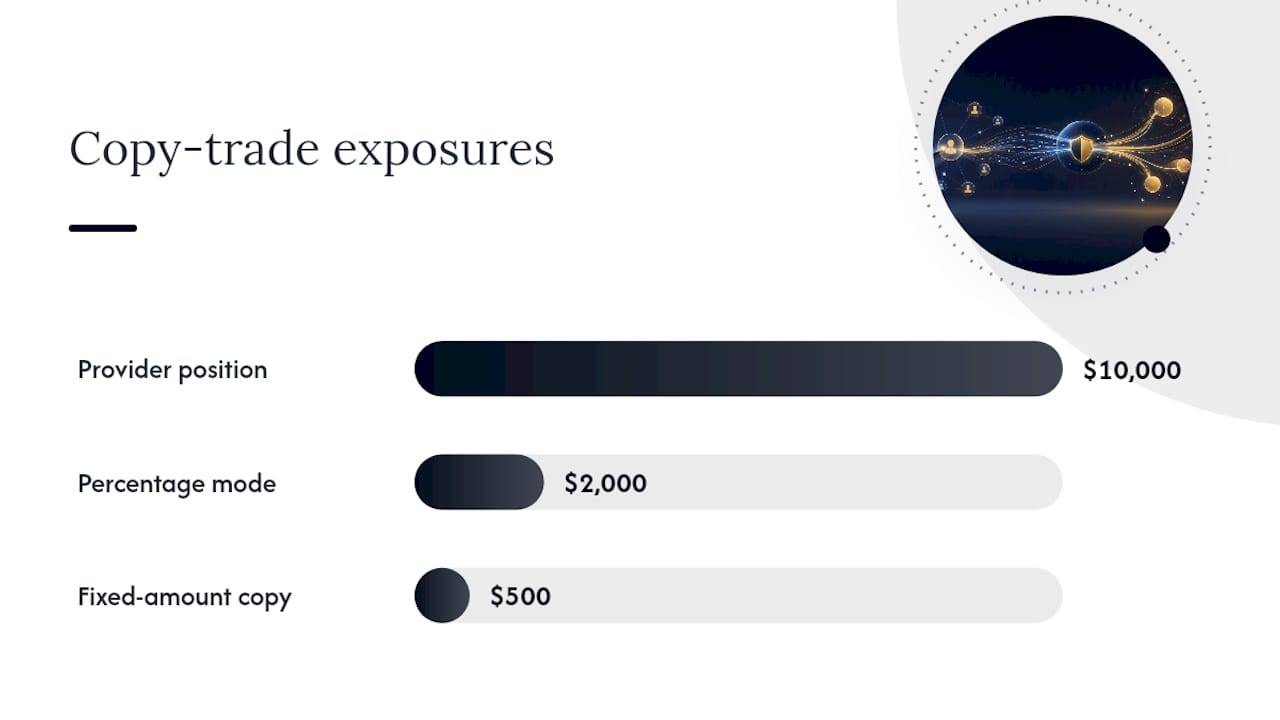
Min per trade, max per trade, and spend limits work together as layered filters. A minimum per-trade threshold stops the platform from executing tiny "dust" trades that cost more in fees or spread than they can plausibly earn. A maximum per-trade cap prevents a single outsized signal from consuming your entire allocation. Per-market limits stop overconcentration in one instrument, and a total spend limit caps your gross exposure across all open positions at once.
Platform APIs like Vezta's copy-trade reference expose these as distinct fields, including maxPositionUsd, maxPerTrade, and maxOpenPositions, which means you can set them once and let the system enforce them automatically rather than watching every trade manually.
Limit price offset and order-book depth decide how aggressively your order chases the market. A limit offset tells the platform how far from the current price it's allowed to place your order; a tighter offset improves your fill price but raises the odds the order never fills at all. Order-book depth settings (commonly labeled Bid L1 through Ask L3) determine which price level in the book your order targets. Bid L1 or Ask L1 gets you closest to the current market price with the best execution odds; deeper levels chase better pricing at the cost of slower or partial fills.
Order duration, slippage tolerance, and fill behavior govern what happens after the order is placed. Limit orders need a minimum duration window (often 90 seconds or more) to give the market a chance to reach your price before the order expires. Slippage tolerance sets how far the execution price can drift from your target before the platform cancels the order. Fill-and-Kill (FAK) behavior means the platform fills whatever quantity it can immediately and cancels the rest rather than leaving a resting order. If your slippage tolerance is set too tight during a fast-moving market, you'll see a string of canceled orders instead of filled positions, which quietly turns off your copy trading without any alert.
- Copy percentage: scales exposure to your account size; best for consistent risk-adjusted sizing.
- Fixed amount: copies a flat size; simpler but can overexpose smaller accounts.
- Limit offset: tighter offset improves price, lowers fill probability.
- Order duration: longer windows raise fill odds but delay entry.
- Slippage tolerance: too tight causes missed trades; too loose invites bad fills.
Stop loss, take profit, and buy/sell toggles round out the picture. You can typically set SL/TP as a percentage of entry price or as a fixed price level, and each has tradeoffs: percentage-based stops adjust automatically to volatility, while price-based stops give you exact control but need manual updates as the market moves. A critical compatibility note from Polycop's documentation: switching your sell execution from market orders to limit orders can break TP/SL triggers if the platform doesn't support limit-based exits, so confirm this before relying on automated exits. Copy buy and copy sell toggles let you follow only entries, only exits, or both. An ignore-trade threshold (commonly set between $10 and $50) filters out trades too small to be worth copying, which reduces noise from a provider's minor position adjustments.
Statistic callout: Platforms commonly default to executing at their own minimum trade size when your calculated copy amount falls below it, a "below-min buy at minimum" rule documented by Polycop. If you're copying at 1% sizing and the platform's floor is $1 for market orders or 5 shares for limit orders, small provider trades can end up proportionally larger in your account than intended, so check this behavior before assuming your percentage setting is exact.
Pro Tip: Set your ignore-trade threshold slightly above your platform's stated minimum trade size, not equal to it. That buffer prevents borderline trades from bouncing between "ignored" and "executed at minimum" as prices fluctuate slightly.
How Do You Set Allocation Caps and Copy Stop-Loss Limits?
Turning parameter fields into an actual risk plan comes down to three numbers: how much you allocate, when you stop, and how spread out you are across providers.
Allocation caps work at two levels. At the provider level, cap any single trader at 10% to 20% of your total copy-capital, a range consistent with the layered-control frameworks described by Xoomar's copy trading risk management analysis. If you have $50,000 in copy-capital and follow three providers, a moderate per-provider cap means no single trader ever controls more than a fraction of that pool.
Copy stop-loss (CSL) should be calculated, not guessed.
| Historical max drawdown | Suggested copy stop-loss |
|---|---|
| Low | Moderate plus buffer |
| Moderate | Higher moderate plus buffer |
| High | Consider reducing allocation |
Xoomar's framework also flags that very high CSLs rarely make sense for a satellite allocation, since you're accepting near-total loss on that sleeve before the system intervenes.
If you hit it, treat re-entry with caution: don't auto-unpause the same settings that just triggered a stop. Review what happened first.
- Set the provider-level allocation cap (10 to 20% of copy-capital).
- Calculate CSL from historical max drawdown plus a 10% buffer.
- Set an account-level equity stop at 15 to 20% of total equity.
- Check correlation across providers before adding a third or fourth.
- Choose a starter profile and hold it for at least one full monitoring cycle before adjusting.
Diversification only helps if the providers you're copying aren't making the same bets. Two gold-focused algorithmic strategies with different entry logic can still move in lockstep during a dollar rally, leaving you "diversified" in name only. Check correlation by comparing drawdown timing across providers, not just their strategy descriptions.
| Profile | Per-provider cap | Copy stop-loss | Providers |
|---|---|---|---|
| Conservative | 10% | Drawdown + 10% | 1 to 2 |
| Balanced | 15% | Drawdown + 10% | 2 to 3 |
| Growth | 20% | Drawdown + 15% | 3 to 5 |
Pro Tip: Before adding a second provider, pull both traders' drawdown periods side by side over the same three months. If the dips line up on the same dates, you've added exposure, not diversification.
What Platform Execution Issues Should You Watch For?
Parameters that look fine on paper can behave differently once they meet real order books. Slippage tolerance set too tight during a fast market causes Fill-and-Kill orders to cancel outright rather than partially fill, meaning your "active" copy setting silently stops producing trades. Set slippage tolerance wide enough to survive normal volatility but tight enough to reject genuinely bad fills, and widen it deliberately around scheduled news events rather than leaving it static.
Platform minimums interact directly with your min-per-trade setting. If your calculated copy size falls below the platform's floor, most systems default to executing at that minimum instead of skipping the trade, a behavior confirmed in Polycop's parameter documentation. That's fine occasionally, but if it happens on every trade, your actual exposure runs consistently higher than your percentage setting implies.
TP/SL compatibility breaks down most often when you switch sell execution from market to limit orders. Limit-based exits may not trigger reliably on every platform, so test this specifically rather than assuming a TP/SL you set will fire the way it did in a demo account. Liquidity and bid-ask spread mechanics, explained well in PennyStockScout's slippage guide, also affect how cleanly your exit orders fill, particularly on thinner markets.
- Run a demo account test before committing real capital to a new parameter set.
- Follow the demo with a one-week micro-pilot at minimal size in a live account.
- Check your activity log daily for rejected or partial fills during the pilot.
- Watch behavior specifically around scheduled news events, not just quiet market days.
- Independent guidance from TV-Hub's risk management documentation recommends pausing new copies entirely around major macro releases rather than trusting default slippage settings to hold.
Statistic callout: Vezta's API documentation lists
maxDailyLoss,maxOpenPositions, anddailyTradeCapas fields that function as automatic circuit breakers, meaning a well-configured account can pause itself before a losing streak compounds, without you having to catch it in real time. Source
What Should You Monitor and When Should You Pause Copying?
A parameter set is not a "set and forget" configuration. It needs a monitoring rhythm and clear rules for when to intervene.
Daily checks should take under five minutes: margin usage as a percentage of equity, number of open positions against your max, and whether any trades were rejected or filled at unusual slippage. Weekly checks go deeper: review trade frequency trends, compare realized drawdown against your CSL, and reread the provider's recent trade rationale if the platform provides one.
Specific numbers work better than vague vigilance:
- Margin usage above 30% of equity — reduce new position sizing immediately.
- Drawdown approaching your calculated CSL — pause new trades before you hit it, don't wait for the automatic stop.
- Sudden spike in trade frequency from a provider — treat as a signal the strategy or market regime changed; review before continuing.
- Slippage running consistently above your baseline tolerance — check for a liquidity problem or a stale offset setting.
When a trigger fires, follow a fixed sequence rather than improvising: pause new trade copying first, then decide whether to close existing positions or let them run to their own SL/TP. Give yourself a cooling-off period, often a few days, before resuming, and use that window to run a short post-mortem.
- Export the account activity log covering the period around the trigger event.
- Note timestamps of rejected or partial fills alongside the market conditions at that time.
- Document which specific parameter (slippage, offset, CSL) needs adjustment, if any.
- Share the exported log with platform support if the behavior looks like a bug rather than a market condition.
A daily loss limit framework built around one hard number, rather than a shifting judgment call, tends to survive stressful weeks better than ad hoc monitoring.
How Does This Look Applied to a Verified Gold Strategy?
That track record gives you something the parameter math above needs: a real historical drawdown figure to anchor your copy stop-loss calculation, rather than a guess.
A sample parameter pack for copying a gold-focused managed strategy might look like this, adjusted for gold's typical intraday volatility:
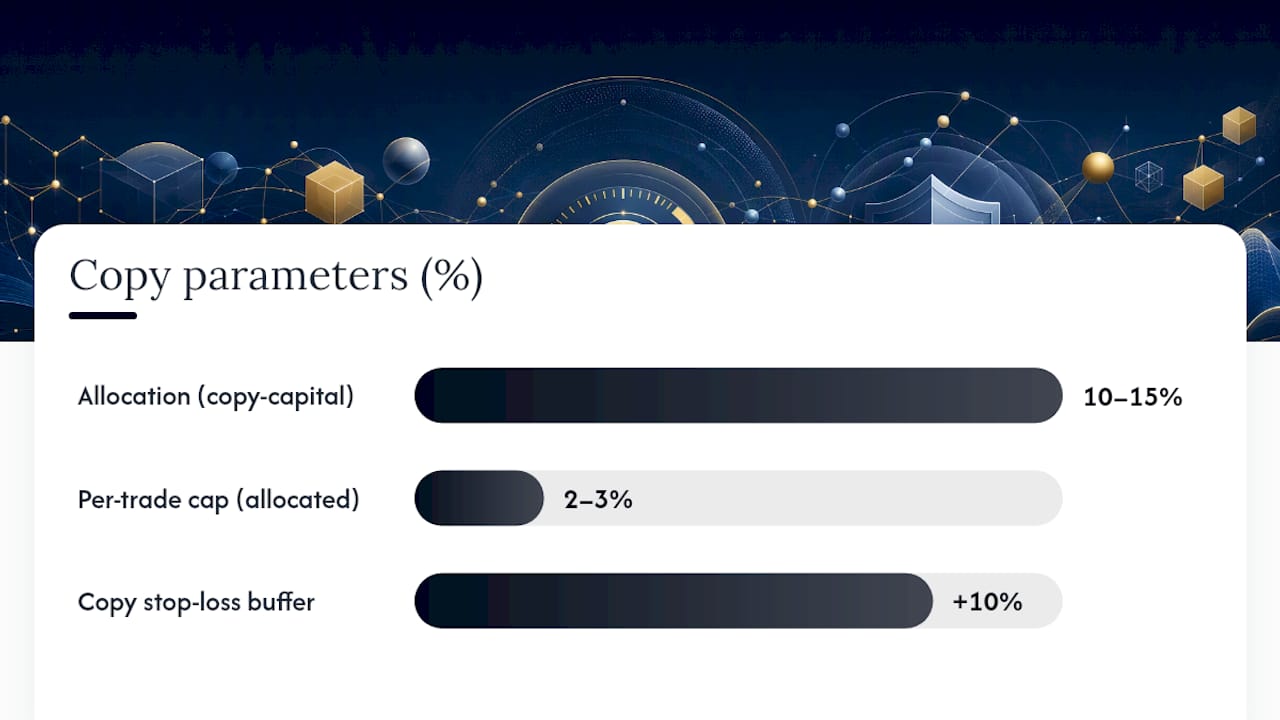
- Allocation: 10 to 15% of copy-capital, reflecting a single-provider conservative-to-balanced profile.
- Per-trade cap: 2 to 3% of allocated capital, since gold moves can be sharp intraday.
- Copy stop-loss: historical max drawdown plus a 10% buffer, calculated from the verified track record rather than assumed.
- Slippage tolerance: set wider than a typical equity trade, since XAUUSD spreads can widen fast around US data releases.
When reviewing any managed strategy's performance report, three things matter more than the headline win rate: consistency across the full verified period, the actual maximum drawdown (not just the average), and total trade count, since a strategy with 40 trades over 18 months tells you far less than one with 400.
A strategy's win rate means little without knowing how it lost the other 20% of the time. Trade count and drawdown depth tell you whether 18 consecutive winning months reflects a repeatable process or a lucky stretch that hasn't yet met a hard market.
You can check the full verified performance record on Sonic AI's Myfxbook results page before setting any allocation figure.
Why Most Copy Trading Advice Skips the Math
Most copy trading content tells you to "manage your risk" without ever showing the arithmetic. That's the gap this guide tries to close: a stop-loss is only useful if it's calculated from a real drawdown figure, and an allocation cap only means something once you've converted it into an actual dollar number against your account.
The conventional advice oversells diversification and undersells correlation checking. Adding a third provider feels safer, but it isn't, if all three get hurt by the same event. I'd also push back on the instinct to leave slippage tolerance at platform defaults. Default settings are built for the average user, not your risk profile, and gold or fast-moving instruments punish that mismatch quickly.
If you take one thing from this guide, take the drawdown-plus-buffer formula for your copy stop-loss. It's the single number that turns a vague sense of caution into an actual, enforceable rule, and it's the one most copiers never bother to calculate.
— Paulo
Ready to Apply These Settings to a Verified Gold Strategy?
Building and testing your own parameter set from scratch takes weeks most traders don't have. There are services that offer managed XAUUSD strategies with verified results and automatic execution through systems like COPYX, so you are not required to manually adjust limit offsets and slippage tolerances.

That matters most for readers who read this whole guide and realized parameter tuning is a real time cost. The managed strategy provider handles that layer, while you control the allocation cap and copy stop-loss on your account, exactly as outlined above. It suits investors seeking gold exposure without manual chart-watching, and network marketers building a referral base around a strategy with a verifiable track record.
Review the gold copy trading strategy details and check the current performance figures before setting your own allocation percentage. If XAUUSD is specifically what you're after, the XAUUSD copy trading page walks through setup with COPYX from the first deposit.
This article is general information, not a substitute for advice from a qualified financial advisor. Consult a qualified financial professional about your own circumstances before acting on anything here.
Sources
Before applying any preset from this guide, check it against your own platform's documentation. Polycop's copy-trading parameter guide covers field-level definitions, limit offsets, and minimum-trade behavior in detail. Vezta's API reference documents the exact field names platforms expose for sizing and circuit breakers. TV-Hub's risk management documentation and BiFu's breakdown of copy trading risk controls both walk through follower-side protections worth cross-checking against whatever platform you use.
- Polycop — Copy trading parameter guide
- Vezta — Copy trade API reference
- TV-Hub — Copy trading risk management