
A daily loss limit (DLL) is a pre-set, non-negotiable cap on the maximum dollar amount you will lose in a single trading session. When it is hit, you close all open positions, log the session, lock your platform if the feature is available, and stop trading until the next session opens. That is the complete operational rule.
The moment your account is down $200 from the session open, you exit everything and walk away.
When your daily loss limit is hit, take these steps immediately:
- Close all open positions at market.
- Cancel all pending orders.
- Log the session result, the time, and the trades that triggered the limit.
- Activate any platform lockout feature available to you.
- Step away from the screen for the remainder of the session.
- Review the trades the following morning, before the next open.
Key Takeaways
A daily loss limit is the single most important session rule for active traders: set it before the open, enforce it without exception, and review every breach the following morning.
| Point | Details |
|---|---|
| Set the DLL before the session | Calculate your dollar cap from account balance and chosen percentage (1%–3%) the night before. |
| Three full-size losses end the day | At 1% per-trade risk and a 3% DLL, three stopped-out trades automatically trigger the session close. |
| Automate enforcement where possible | Platform lockouts and auto-close features remove the willpower requirement from DLL compliance. |
| Scale the percentage on a schedule | Increase the DLL percentage only after meeting a performance gate, never mid-session or on impulse. |
| Sonicaigold enforces risk at the system level | The automated XAUUSD strategy applies risk controls at execution, with 18+ months of audited performance available for review. |
Table of Contents
- What a daily loss limit is and how it differs from per-trade stops and drawdown limits
- How to calculate your daily loss limit with worked examples
- Loss-from-top vs. flat daily loss limit: which one fits your situation
- How daily loss limits are enforced in practice
- How to adjust your daily loss limit as your skill and account size grow
- Practical risk controls to pair with a daily loss limit
- Worked examples and decision flow for common account sizes
- Common mistakes and behavioral traps that undermine your daily loss limit
- Automation and copy trading as a way to enforce daily loss discipline
- Why the daily loss limit is the one rule you cannot negotiate
- Sonicaigold offers an audited, automated approach to gold trading risk
- Sources
What a daily loss limit is and how it differs from per-trade stops and drawdown limits
A daily loss limit, a per-trade stop-loss, and a drawdown limit are three distinct controls that operate at different time horizons. Conflating them is one of the most common structural errors in retail trading risk management.
A per-trade stop-loss is the maximum loss on a single position, typically expressed as a percentage of account equity or a fixed dollar amount. It exits one trade. A daily loss limit is the maximum cumulative loss across all trades in one session. It ends the trading day. A drawdown limit (or loss-from-top) is the maximum decline from a peak equity level over a longer period, often a week or a month, and it governs whether you continue trading at all.
Risk management in trading at the practitioner level treats these as a layered system. Per-trade stops prevent any single position from doing catastrophic damage. The DLL catches the scenario where multiple small stops are hit in sequence, a pattern that can wipe a session's P&L before a trader realizes the day is broken. The drawdown limit then governs the longer arc.
The behavioral rationale for a DLL is specific. After two or three consecutive losses, most traders experience a cognitive shift: they begin trading to recover losses rather than to find good setups. This is tilt, and it is the primary mechanism behind account blow-ups. A DLL removes the decision entirely. According to TiltGuard, automating enforcement with a lockout tool prevents hot-state overrides, which are the moments when a trader knows the rule but trades through it anyway.
Pro Tip: Set your DLL the night before, not the morning of. Pre-commitment made outside of market hours is far more reliable than a number you set while watching the open.
How to calculate your daily loss limit with worked examples
Three methods are in common use: the percentage method, the fixed-dollar method, and the journal-based method. Each has a different starting point, but all three should produce a number you write down before the session opens.
The percentage method
The formula is straightforward:
DLL ($) = Account Balance × DLL (%)
Tradezella's risk management framework recommends a 3% daily cap as a practical standard for many traders. DayTradingToolkit recommends starting at 2% for beginners.
The fixed-dollar method
Some traders prefer a flat dollar number because it removes the need to recalculate after every equity change. The advantage is psychological: a "boring" fixed number is easier to honor than a percentage that shifts with equity. The disadvantage is that it does not scale, so it requires a deliberate review on a set schedule.
The journal-based method
This method is practical for traders with at least 60 journaled sessions. Mirror-your-average-winning-day calibration aligns your loss cap with your typical win, which Tradicted describes as a pragmatic anchor. If your average winning day produces $320, your DLL sits at $256–$320. This approach ties risk directly to demonstrated performance rather than an arbitrary percentage.
Position-sizing checklist
Before the session opens, confirm these four items:
- Calculate your DLL in dollars for today's account balance.
- Divide the DLL by your per-trade stop size to find the maximum number of full-size losses allowed.
- Reduce position size if volatility is elevated (wider stops mean fewer shares or contracts per trade).
- Write the DLL dollar figure on a sticky note or your trading platform's risk dashboard before placing the first order.
Loss-from-top vs. flat daily loss limit: which one fits your situation
A flat DLL is measured from the session open. If your account opens at $10,000 and your DLL is $300, you stop trading when the balance reaches $9,700, regardless of what happened intraday.
A loss-from-top (also called drawdown-from-peak) is measured from the highest equity point reached during the session. If your account peaks at $10,400 intraday and your loss-from-top is $300, you stop trading when the balance falls to $10,100. You are protecting realized intraday gains, not just the opening balance.
The flat DLL is simpler and better suited to beginners. It requires no intraday tracking of equity peaks, and it is the standard enforced by most prop firms. The loss-from-top variant is more appropriate for traders who consistently build intraday profits and want to protect them. Its primary disadvantage is complexity: it requires real-time equity monitoring and is harder to automate on most retail platforms.
The practical decision rule: use a flat DLL until you have at least three months of sessions where you regularly build intraday gains before giving them back. At that point, a loss-from-top variant becomes worth the added complexity.
How daily loss limits are enforced in practice
Enforcement is where most traders fail. Knowing the rule is not the same as having a mechanism that applies it.
Broker and platform enforcement options:
- Auto-close: The platform automatically liquidates all open positions when the DLL threshold is reached. This is the most reliable form of enforcement.
- New-order block: The account accepts no new orders once the DLL is hit, but existing positions remain open until manually closed.
- Account freeze: The account is locked for the remainder of the session. No new orders, no modifications to existing orders.
- Not-held liquidation: The broker liquidates positions at its discretion when margin thresholds are breached, which is not the same as a DLL and should not be confused with one.
Prop and funded-account rules operate differently from retail accounts. Most evaluation programs set a daily loss limit as a hard rule: breaching it fails the evaluation or triggers a reset. The daily reset time varies by firm, typically midnight Eastern Time or the start of the New York session. Many programs also impose a weekly drawdown cap alongside the daily limit. For funded-account traders, TiltGuard recommends calculating your DLL as a fraction of the firm's maximum drawdown to preserve headroom for recovery.
Operational considerations to account for:
- Slippage on auto-close orders can push the realized loss slightly beyond the DLL threshold, particularly in fast markets.
- Margin calls are not DLL enforcement. A margin call is a broker's protection of its own capital, not yours.
- "Locked for the day" means no new positions. It does not mean you are protected from losses on positions already open at the time of the lock.
A commonly cited daily cap is around 3%, per Tradezella's layered risk framework, but the enforcement mechanism matters as much as the number itself.
Action checklist for setting platform limits:
- Locate the risk settings panel in your platform (NinjaTrader, TradeStation, Thinkorswim, or your broker's web portal).
- Enter the DLL as a dollar amount, not a percentage, since most platforms accept dollar inputs.
- Test the behavior in a simulator or paper-trading account before relying on it in a live session.
- Confirm whether the platform uses auto-close or new-order block, and understand the difference before going live.
How to adjust your daily loss limit as your skill and account size grow
The DLL you set when you open an account should not be the DLL you use two years later. Scaling it up requires a structured process, not a feeling.
Rules for scaling:
- Recalculate the DLL weekly or monthly based on current account balance. Never recalculate mid-session.
- Do not increase the DLL percentage until you have met a performance gate (see below).
- When account size grows, the dollar cap grows automatically at the same percentage. That is not the same as loosening the DLL.
- Tighten the DLL after a drawdown period. If your account drops 10% from its peak, reduce the DLL percentage until you recover.
Performance gates before loosening the DLL percentage:
The CME Group notes that rules like the 2% rule are ultimately arbitrary; adherence to a chosen level is the critical factor. That framing matters here: the right time to loosen a DLL is not when you want more room, it is when your track record justifies it.
A practical gate structure:
- Move from 1% to 2%: Minimum 60 consecutive sessions with no DLL breaches and a positive expectancy over that period.
- Move from 2% to 3%: Minimum 90 sessions at 2%, positive net P&L, and a Rule Adherence Score (the percentage of sessions where you honored the DLL) above 95%.
- Move above 3%: Reserved for traders with a multi-year track record and a documented edge. Most active day traders do not need to go above 3%.
Practical risk controls to pair with a daily loss limit
A DLL alone is not a complete risk system. It catches the cumulative damage from multiple losses in a session, but it does not prevent any individual trade from being oversized or poorly placed.
The layered control stack:
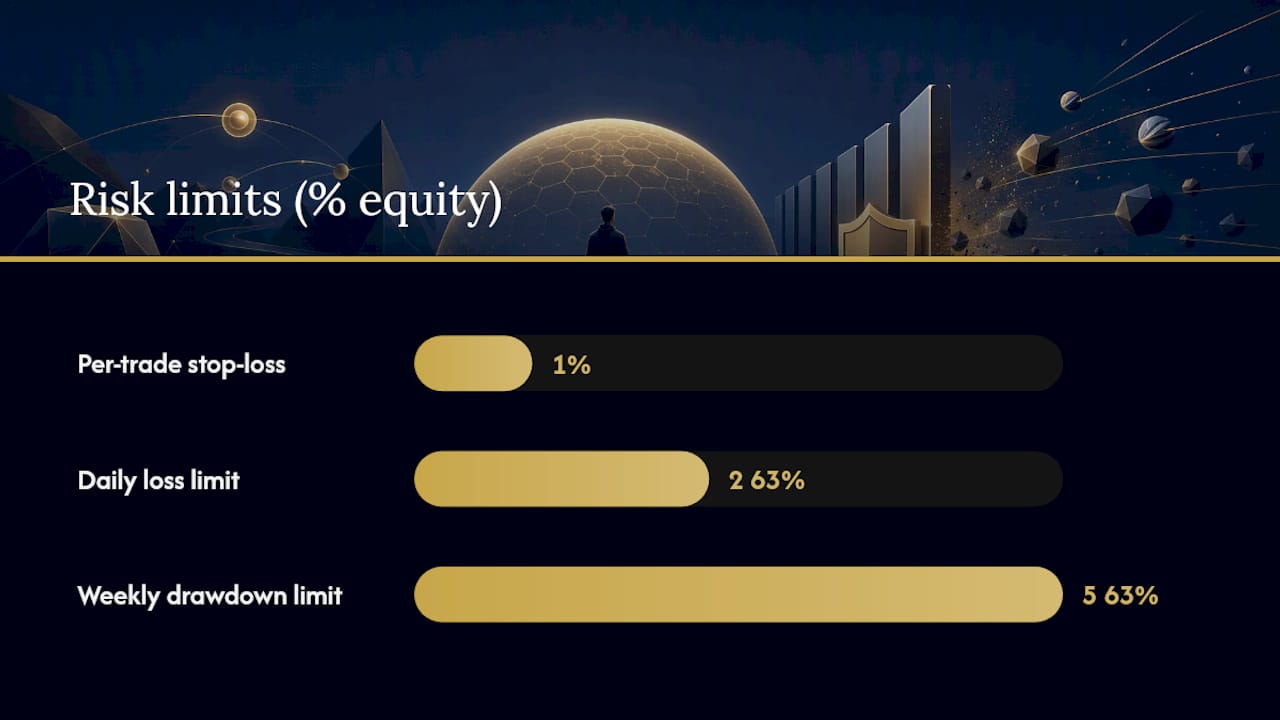
- Per-trade stop-loss: Set at 1% of account equity per trade as a starting point, per Investopedia's risk management guidance. This is the first line of defense.
- Daily loss limit: The session cap, set at 2%–3% of account equity.
- Weekly drawdown limit: A cap on cumulative losses across the week, typically 5%–6% of account equity.
- Recovery protocol: If the weekly limit is hit, reduce position size by 50% for the following week.
Volatility-adjusted stops use the Average True Range (ATR) to size stops relative to current market conditions. When ATR expands, the stop widens and position size must shrink to keep the per-trade dollar risk constant. For traders in volatile markets like gold (XAUUSD), adjusting stops for volatility is a practical necessity, not an optional refinement.
Hedging and protective options are relevant for larger equity accounts. A protective put on an equity position caps the downside on that position without requiring an exit. For most intraday traders, this adds complexity without proportional benefit. It is worth considering for swing positions held overnight where a gap risk exists.
Pre-session checklist:
- Write the DLL dollar figure before the first trade.
- Check the economic calendar for high-impact events (FOMC, CPI, NFP) that may require tighter stops or no trading.
- Confirm position size for the first trade using the ATR-adjusted stop.
- Write a one-line session plan: the setup you are looking for and the conditions under which you will not trade.
Pro Tip: After two consecutive losses in a session, pause for 30 minutes before placing the next trade. This single rule, recommended by DayTradingToolkit, catches the majority of revenge-trading sequences before they compound.
Worked examples and decision flow for common account sizes
These three scenarios cover the most common account sizes for active retail traders. Each shows the DLL calculation, the position-sizing implication, and the exact steps to take when the limit is hit.
| Account Size | DLL % | DLL ($) | Per-Trade Risk (1%) | Max Full-Size Losses Before DLL |
|---|---|---|---|---|
| $5,000 | 2% | $100 | $50 | 2 |
| $10,000 | 2% | $200 | $100 | 2 |
| $50,000 | 3% | $1,500 | $500 | 3 |
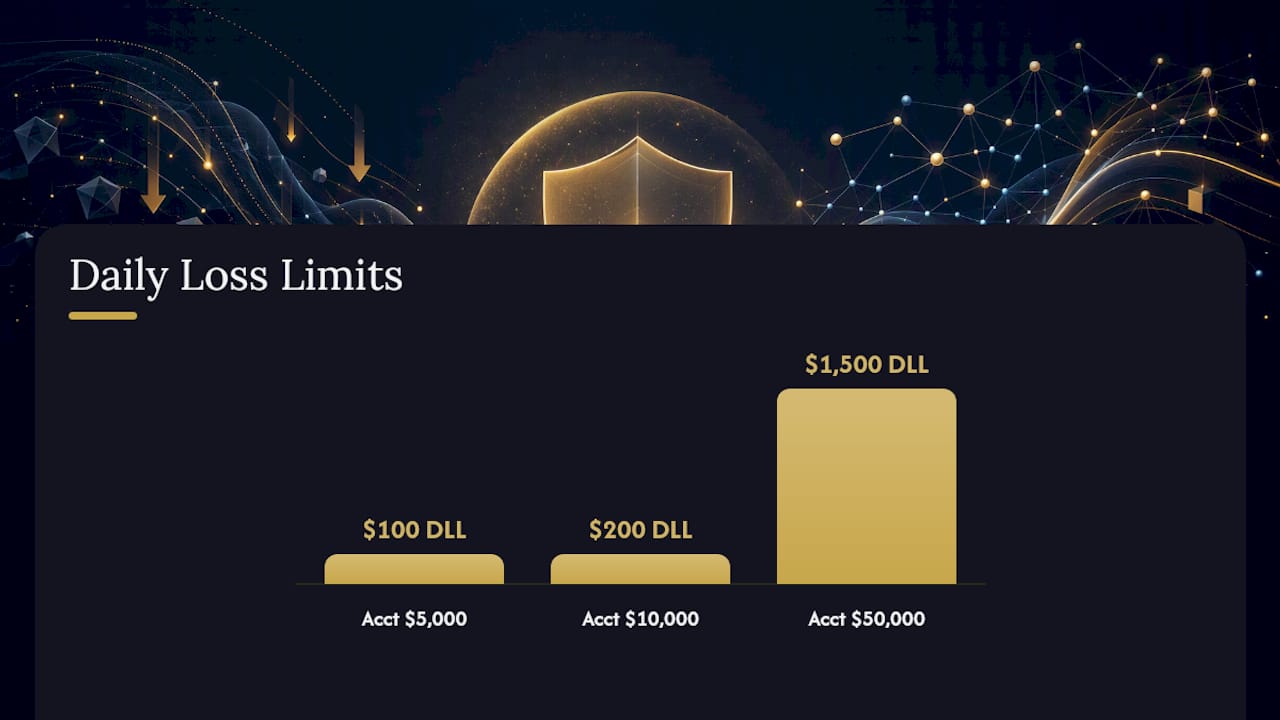
Scenario 1: $5,000 beginner account DLL is $100. Per-trade risk is $50. Two full-size losses end the session. On a day when the first trade loses $50 and the second loses $50, the DLL is hit at exactly $100. The trader closes the platform and logs the session. No third trade is placed regardless of how good the next setup looks.
Scenario 2: $10,000 intermediate account DLL is $200. Per-trade risk is $100. After one $100 loss, the trader has $100 of DLL remaining. The second trade is sized at half the normal position to reduce the risk of hitting the limit on a single trade. This is a practical adjustment many traders make after the first loss of the day.
Scenario 3: $50,000 established account DLL is $1,500. Per-trade risk is $500. Three full-size losses end the session. The trader also applies a loss-from-top rule: if the account peaks at $51,200 intraday, the session ends if the balance falls to $49,700 (a $1,500 drawdown from the peak).
Decision flow when the DLL is hit:
- Exit all positions immediately at market.
- Cancel all pending orders.
- Record the time, the total loss, and the number of trades taken.
- Lock the platform or log out.
- Do not re-enter the platform until the following session.
- Review the session the next morning: identify the trade or sequence that drove the loss and note whether the setup was within your plan.
Sample session rules for ongoing use:
- Maximum trades per session: 5 (adjust based on your strategy's typical frequency).
- After two consecutive losses: mandatory 30-minute pause.
- Three DLL-hit days in one week: reduce position size by 50% for the following week.
Common mistakes and behavioral traps that undermine your daily loss limit
The DLL fails when traders treat it as a guideline rather than a rule. These are the specific failure modes to watch for.
Red flags that indicate the DLL is being compromised:
- Moving the limit after the first loss ("just one more trade to get back to breakeven").
- Keeping the trading platform open after the DLL is hit.
- Taking a position in a different instrument or account after hitting the limit in the primary account.
- Repeated "close misses" where the session ends just above the DLL, suggesting the limit is being used as a target rather than a floor.
- Logging the loss but not stopping trading, treating the log as a ritual rather than a trigger.
Corrective actions:
- Use a forced platform lock. If your broker does not offer one, log out and give your login credentials to someone else for the remainder of the session.
- Apply the phone-away rule: after hitting the DLL, place your phone and computer in a different room for at least one hour.
- Find an accountability partner, another trader who checks your daily log and calls you out on breaches.
- Review every DLL breach in your trading journal within 24 hours. Write one sentence identifying the specific decision that caused the breach and one sentence describing the process change that prevents it.
Converting breaches into process fixes is the only productive use of a DLL violation. Guilt without a corrective action produces no change in behavior.
Automation and copy trading as a way to enforce daily loss discipline
Automated systems remove the willpower requirement from DLL enforcement. This is their primary advantage. A rule coded into a system executes regardless of how the trader feels at 2:00 PM after three losing trades.
The tradeoff is technical due diligence. An automated system that enforces a DLL is only as reliable as its configuration. A misconfigured stop, a connectivity failure, or a broker execution issue can all cause the system to behave differently from its specification.
Due-diligence checklist for managed or copy-trading strategies:
- Independent performance verification: look for audited statements from a third-party service, not screenshots provided by the strategy provider.
- Track record length: a minimum of 12 months of live trading data, not backtests.
- Access to Myfxbook or a comparable verified statement that shows drawdown, win rate, and consecutive losing periods.
- Hard vs. soft stop behavior: confirm whether the system uses a hard stop (automatic position closure) or a soft stop (an alert that requires manual action).
- Fee structure: understand whether fees are charged on gross gains or net gains, and how they interact with drawdown periods.
How to verify enforcement before committing capital:
- Run a simulated test using the strategy's stated parameters on a demo account for at least 30 sessions.
- Start with a low-capital live pilot to confirm that the system behaves as described under real execution conditions.
- Monitor P&L hooks daily during the pilot period and compare realized drawdown against the stated DLL.
Copy-trading safety and risk controls are worth reviewing before committing to any managed strategy, particularly for traders who are new to automated execution.
Why the daily loss limit is the one rule you cannot negotiate
Most risk rules have legitimate exceptions. Position sizing adjusts for volatility. Stop placement adapts to the setup. The DLL has no exceptions.
The reason is structural. Every other rule in a trading system is designed to optimize performance within a session. The DLL is designed to end the session when the conditions for good decision-making no longer exist. Those two objectives are incompatible. You cannot simultaneously optimize a session and end it.
Traders who treat the DLL as one rule among many, subject to situational override, consistently underperform traders who treat it as absolute. The CME Group's framing is direct: the exact percentage matters less than the commitment to honor it.
The pre-session habit that supports this: before the open, write the DLL dollar figure and the word "done" next to it. That word is the instruction for when the number is hit. No deliberation, no context, no exceptions. Done.
Post-limit review is equally important. The session after a DLL hit is the highest-risk session of the week. Traders are statistically more likely to overtrade, undersize stops, or chase setups on the day following a loss day. A written review the morning after, completed before the platform opens, is the most effective counter to that pattern.
Sonicaigold offers an audited, automated approach to gold trading risk
For traders who want DLL discipline enforced at the system level rather than the willpower level, a managed copy-trading strategy with verified risk controls is worth evaluating.

Sonicaigold runs an automated gold (XAUUSD) strategy with 18+ consecutive winning months of independently verified performance, accessible via the COPYX copy-trading system. The strategy enforces risk rules at the execution level, removing the manual enforcement step entirely. Performance data is available through audited Myfxbook results, so the track record is verifiable before any capital is committed.
Before evaluating any managed strategy, apply this checklist: independent performance verification, a minimum 12-month live track record, hard stop enforcement, a transparent fee structure, and a low-capital pilot period. Sonicaigold's gold copy-trading page covers setup, fee structure, and how to start with a pilot allocation. Review the audited results first, then decide.
Sources
These sources provide the primary documentation and practitioner guidance referenced throughout this article.
- The 2% rule — CME Group
- Risk management in trading — Investopedia
- Daily Loss Limits for Traders | TiltGuard
- Risk Management in Trading: The Complete Guide (2026) — Tradezella
- Daily Max Loss Rule for Day Trading: When to Stop Trading | DayTradingToolkit
This article is general information, not a substitute for advice from a qualified financial advisor. Consult a qualified financial professional about your own circumstances before acting on anything here.