
Yes, you can copy-trade XAUUSD on MetaTrader 4. The platform supports it through three routes: the built-in MQL5 Signals service, an investor-password feed read in a second terminal, and a dedicated trade copier EA. Most MT4 users end up on the investor-password or dedicated-copier path because MT4's native Signals marketplace is thinner than MT5's. Whichever route you choose, the safety-first sequence is the same: demo test before going live, verify your XAUUSD symbol mapping, scale lot sizes to your account equity, set an equity stop, and run everything on a Forex VPS to keep latency low and uptime stable.
Five quick actions to take in the next hour:
- Demo test first. Open a demo account on your broker and run at least 20 copied trades before funding a live account.
- Verify XAUUSD symbol mapping. Confirm the exact symbol name your broker uses (XAUUSD, XAUUSDm, XAUUSD.raw) and map it correctly in your copier settings.
- Set lot scaling. Never copy master lot sizes blindly. Use a percent-of-equity rule or an explicit multiplier based on your account size relative to the master.
- Enable an equity stop. Configure your copier or MT4 to halt copying if your account drops below a set equity threshold.
- Run on a VPS. A Forex VPS keeps your terminal online 24/5 without relying on your home internet connection.
Key Takeaways
MT4 XAUUSD copy trading works reliably when you verify symbol mapping, scale lots to your account equity, run on a VPS, and vet providers by verified drawdown history rather than win-rate claims alone.
| Point | Details |
|---|---|
| Demo before live | Run at least 20 copied trades on demo to confirm symbol mapping and lot scaling before funding a live account. |
| Translate lot sizes carefully | Use equity-based proportional scaling or an explicit formula; never copy master lot sizes directly to a smaller account. |
| VPS and equity stop | Run MT4 on a Forex VPS for 24/5 uptime and configure an equity stop to halt copying automatically at a set drawdown threshold. |
| Vet providers by verified history | Require a linked broker or Myfxbook record showing raw trade history, max drawdown, and average slippage before subscribing. |
| Sonicaigold managed option | Sonicaigold offers verified XAUUSD performance via COPYX auto-execution, removing the operational overhead of self-managed MT4 copying. |
Table of Contents
- How MT4 XAUUSD copy trading actually works
- What makes copying XAUUSD on MT4 different from other pairs
- Step-by-step setup for MT4 XAUUSD copy trading
- How to choose an XAUUSD signal provider for MT4
- Practical risk and money management for copying gold on MT4
- Execution, slippage, VPS, and broker compatibility
- Fees, subscription models, and a financial risk note
- When a professionally managed gold-only auto-trading service makes sense
- A clear-eyed view on MT4 XAUUSD copy trading
- Sonicaigold's gold-only auto-trading: verified results, no platform management required
- Sources
How MT4 XAUUSD copy trading actually works
The core architecture is master and slave. A master account, whether a signal provider or your own source account, opens and manages trades. A slave account, your follower account, receives those trades and replicates them. The copier sits in between, detecting new orders on the master and placing matching orders on the slave as fast as possible.
MT4 supports three practical copy routes, and each one trades off speed against control:
- Built-in Signals marketplace. You subscribe to a provider directly from the Signals tab in MT4. Setup is simple, but your control over lot sizing and filtering is limited compared to a dedicated copier.
- Investor-password feed. You open a second MT4 terminal logged into the master account with read-only investor credentials. A copier EA watches that terminal and mirrors trades to your live account. No trade execution rights on the master, just observation.
- Dedicated trade copier EA. Tools like Local Trade Copier and Forex Copier EA run as expert advisors on both accounts. Local Trade Copier excels at near-zero latency for same-machine setups; Forex Copier EA handles remote copying with multiplier and filter options. Both give you full control over risk settings.
Allocation methods
How your copier translates master lot sizes to slave lot sizes is where most beginners make mistakes. Three methods exist:
- Fixed lot. Every master trade copies as a fixed lot size on the slave, regardless of master size. Simple, but ignores account-size differences.
- Lot multiplier. The slave lot equals the master lot multiplied by a fixed factor (e.g., 0.5x). Easy to set, but still ignores equity differences between accounts.
- Equity-based proportional scaling. The slave lot is calculated as a percentage of the slave's equity relative to the master's equity. If the master has $50,000 and the slave has $5,000, a 0.1x ratio applies automatically. This is the most accurate method for preventing over-leveraging on smaller accounts.
Execution differences appear at several points: the time between master order placement and copier detection, the time between detection and slave order submission, and any spread or price difference between the two brokers at that moment. For XAUUSD, where price can move $2–$5 per minute during active sessions, even a 200ms delay can mean a materially different fill.
Pro Tip: Before going live, place five pending orders on the master and watch how the slave copies them. Check whether stop-loss and take-profit levels transfer correctly, and note the time gap between master fill and slave fill. That gap is your baseline latency.
What makes copying XAUUSD on MT4 different from other pairs
Gold is not EUR/USD. The contract specs, volatility profile, and symbol naming conventions create specific problems for copy traders that currency pairs do not.
Symbol variants and why they matter
Your broker may list gold as XAUUSD, XAUUSDm, XAUUSD.raw, XAUUSD-STD, or XAUUSD_i, depending on their account type structure. If your copier maps XAUUSD on the master to XAUUSD on the slave but your slave broker uses XAUUSDm, every order will be rejected. That is not a minor inconvenience. It means zero trades copy until you fix it, and you may not notice immediately.

Check the exact symbol name in your slave broker's Market Watch window before configuring any copier. Then enter that exact string in the copier's symbol-mapping table.
XAUUSD contract characteristics
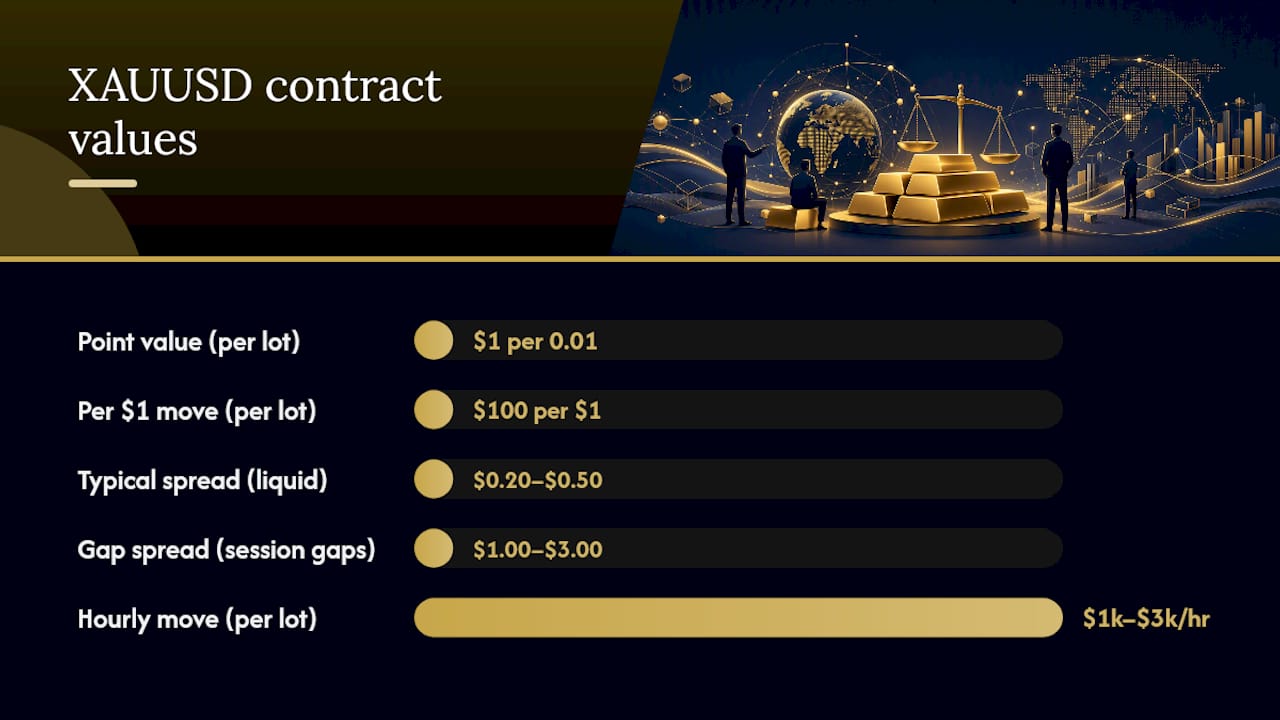
Gold trades in troy ounces. A standard lot is 100 troy ounces, so a 1-pip (0.01 price unit) move on a standard lot equals $1. A 1.00 full-point ($1.00 price move) on a standard lot equals $100. During the London and New York sessions, XAUUSD can move $10–$30 in a single hour. That translates to $1,000–$3,000 per standard lot per hour of exposure.
Spreads on XAUUSD are wider than on major currency pairs, typically $0.20–$0.50 during liquid hours and $1.00–$3.00 during session gaps (Friday close, Sunday open, and around major economic releases). Swap rates on gold positions are also higher than on most forex pairs and can run negative on both long and short positions depending on the broker.
Broker contract specs and margin requirements differ materially across brokers, which changes how a copied gold trade behaves on the slave account. Confirm these four data points on every broker page before copying:
| Spec to check | What to look for |
|---|---|
| Symbol name | Exact string used in Market Watch |
| Contract size | Standard = 100 oz; confirm mini/micro variants |
| Point value | Value per 0.01 price move per lot |
| Margin per lot | At your account's leverage level |
Pro Tip: If the master trades 1.00 lot and your slave account is one-tenth the size, start with a 0.10 lot multiplier. Then calculate the dollar risk per trade at that size using gold's point value. If the risk per trade exceeds 2% of your slave equity, reduce the multiplier further before going live.
Step-by-step setup for MT4 XAUUSD copy trading
Work through this in order. Do not skip the demo phase.
-
Download and install MT4. Get the terminal from your broker's website, not a third-party source. Create separate demo accounts for the master (or source) and the slave (your follower account).
-
Choose your copy route. If you are subscribing to a signal provider, use the Signals tab. If you have investor-password access to a master account, open a second MT4 terminal and log in with those credentials. If you are using a dedicated copier EA, install it on both terminals per the copier's documentation.
-
Configure symbol mapping. In your copier's settings, create a mapping entry: master symbol → slave symbol. Example: XAUUSD → XAUUSDm. Test by placing a demo trade on the master and confirming the slave receives it on the correct instrument.
-
Set lot scaling and risk limits. Enter your chosen allocation method (equity-based is recommended). Set a maximum lot cap so no single copied trade can exceed a size you have explicitly approved. Lot multipliers, equity scaling, and max-lot caps are the three controls that prevent a large master from overleveraging your account.
-
Enable MT4 terminal settings for signals. If using the Signals tab, go to Tools → Options → Expert Advisors and check "Allow automated trading." In the Signals tab, enable "Allow subscription to receive signals" and configure copy SL/TP and load-on-deposit settings. These sync options control how the terminal handles order replication.
-
Run a demo test checklist. Over at least 10–20 trades, verify: (a) trades copy to the correct symbol, (b) stop-loss and take-profit levels transfer intact, (c) copy latency is acceptable for the strategy's timeframe, (d) margin calls on the slave do not trigger at normal master position sizes.
-
Configure an equity stop. Set a threshold (e.g., stop copying if slave equity drops below 80% of starting balance) in your copier or as an MT4 alert. This is your automatic kill-switch.
-
Move to live with a small allocation. Fund the live slave account at a fraction of your intended allocation. Run for two to four weeks before scaling up. Watch the daily log for rejected orders or sync errors.
Pro Tip: Run both terminals on the same VPS instance. Same-machine copying cuts latency to near zero. Choose a VPS data center close to your broker's server location, which is usually listed in the broker's technical documentation or support pages.
How to choose an XAUUSD signal provider for MT4
The MQL5 Signals marketplace lists XAUUSD providers with subscription fees commonly ranging from $30 to $199 per month, alongside execution metrics including gross profit, average slippage, and maximal consecutive wins and losses. Those numbers are the starting point, not the finish line.
Performance metrics that actually matter
- Verified track record. The provider's account should be linked to a real broker and show a continuous, unedited trade history. Myfxbook verification or a direct broker link is the standard. Anything self-reported without a link is unverifiable.
- Profit factor. Gross profit divided by gross loss. A profit factor above 1.5 over at least six months of live trading is a reasonable baseline for XAUUSD strategies.
- Maximum drawdown. How far the account dropped from peak equity. For gold strategies, a max drawdown above 30% of peak equity is a warning sign, not a selling point.
- Average trade duration. Scalpers hold minutes; swing traders hold days. Match the strategy's timeframe to your own schedule and VPS uptime requirements.
- Max consecutive losses. A string of 8–10 consecutive losses is not unusual in gold trading, but a provider who hides this metric is hiding something.
- Sample size. Fewer than 200 trades is too thin to draw conclusions. Six months minimum; 12 months is better.
Fee structure and total cost
Subscription fees are only part of the cost. Add the spread on every copied trade (XAUUSD spreads at $0.30–$1.00 per lot during liquid hours), swap charges on overnight positions, and any performance-sharing the provider charges. Signal pages on MQL5 show average slippage calculated from the difference between the provider's broker quote and the subscriber's quote. A provider with $0.50 average slippage on XAUUSD is meaningfully cheaper to copy than one with $2.00 slippage, even at the same subscription price.
Red flags
- Results hosted only on the provider's own website with no third-party verification link.
- Win rate above 90% with no raw trade log available.
- Drawdown data missing or described only as "low."
- Account history shorter than three months.
- No information on which broker the master runs on.
Pro Tip: Check the top XAUUSD signal providers list and filter by providers who publish average slippage, maximum consecutive losses, and a linked broker account. Those three disclosures alone eliminate most bad actors.
Practical risk and money management for copying gold on MT4
Position sizing is where copy trading either protects you or destroys you. Gold's per-point value amplifies both gains and losses faster than most traders expect.
Position-sizing formula
A simple equity-percentage approach: if you want to risk 1% of your $10,000 slave account on a trade with a 50-point stop-loss, the maximum lot size is:
Risk amount ÷ (stop-loss in points × point value per lot)
For XAUUSD: $100 ÷ (50 × $1.00) = 2.00 lots maximum. If the master is trading 5.00 lots on a $50,000 account, your proportional equivalent is 1.00 lot, not 5.00. Always run this calculation before setting your multiplier.
Allocation and diversification
Gold is correlated with USD strength, inflation expectations, and geopolitical events, so a single bad macro week can hit all gold positions simultaneously regardless of strategy quality. If you copy multiple providers, confirm they are not all running the same directional bias.
Protection layers
- Equity stop: halt copying below a set equity floor (e.g., 80% of starting balance).
- Max daily loss stop: close all positions and pause copying if the account loses more than a fixed percentage in one trading day.
- Maximum lot multiplier cap: no single copied trade exceeds a hard lot ceiling you set manually.
- News pause filter: top copiers include built-in news-pause filters that suspend copying around major economic releases, which is particularly useful for XAUUSD given its sensitivity to CPI, NFP, and Fed announcements.
Risk notice: Copy trading does not eliminate risk. Past performance of any signal provider is not a guarantee of future results. Gold (XAUUSD) is a volatile instrument, and copied trades can incur losses exceeding your initial deposit depending on leverage settings. Always demo-test before committing live capital, and consider seeking independent financial advice before trading leveraged instruments.
Pro Tip: Run a simulated drawdown test on demo: manually set the master to open a losing sequence and watch how your equity stop and lot caps respond. Fix any gaps before going live.
Execution, slippage, VPS, and broker compatibility
Technical quality determines whether a good strategy stays good after copying. A provider with a 1.8 profit factor on their account can deliver a 1.2 profit factor on yours if execution is poor.
Why slippage hits gold harder
XAUUSD scalpers operate on tight margins. A 3-point slippage on a 10-point target trade eliminates 30% of the expected profit. Swing traders are less affected because their targets are measured in dollars per lot, not points. Before subscribing to any scalping signal, check the published average slippage on the provider's MQL5 page. Anything above 2 points average slippage on a scalping strategy is a structural problem.

Spread widening during session gaps compounds this. If the master opens a trade at 11:00 PM GMT when spreads are $0.30, but your slave broker's spread is $2.50 at that hour, the copied trade starts $2.20 in the hole before price moves at all.
VPS requirements
A Forex VPS keeps your MT4 terminal running 24 hours a day, 5 days a week, without depending on your home internet or power supply. For XAUUSD copy trading, VPS is not optional if you are copying intraday or scalping strategies. Symbol mismatches and latency are the two most common causes of copy errors, and a VPS co-located near your broker's server addresses the latency half of that problem directly. Target under 10ms round-trip latency to your broker's server.
What to log and monitor daily
- Copy latency: time between master order and slave fill, logged per trade.
- Rejection rate: percentage of master trades that fail to copy on the slave.
- Average slippage in points: compare your live slippage to the provider's published figure.
- Sync mismatches: open positions on the master with no corresponding position on the slave.
Pro Tip: Keep a short daily audit log in a spreadsheet: date, number of trades copied, number rejected, average latency, and any anomalies. After two weeks, patterns become visible. A rising rejection rate usually means a symbol-mapping drift or a broker maintenance window you were not aware of.
Fees, subscription models, and a financial risk note
The real cost of copying XAUUSD on MT4 has four components, and most beginners only account for one.
- Signal subscription fees. MQL5 signal pages for XAUUSD commonly show fees from $30 to $199 per month. A $30/month signal copied 20 times per month costs $1.50 per trade in subscription cost alone before any spread.
- Spread cost. At $0.50 average spread on XAUUSD and 20 trades per month at 0.5 lots each, spread cost is $500/month. That number scales directly with lot size and trade frequency.
- Swap/overnight financing. Gold swaps are often negative on both sides and can run $5–$15 per standard lot per night depending on the broker. A swing strategy holding positions for three to five days accumulates meaningful swap costs.
- Performance-sharing models. Some providers charge a percentage of profits rather than a flat fee. Read the fee structure on the signal page before subscribing.
To compare total cost across providers, calculate the effective cost per traded lot: (monthly subscription ÷ average trades per month ÷ average lot size) + average spread + average swap per trade. That single number lets you compare a $30 high-frequency signal against a $199 low-frequency one on equal terms.
Regulatory note: Always use a regulated broker for XAUUSD copy trading. Regulation varies by country. In the EU, look for FCA or CySEC authorization; in Australia, ASIC; in the US, NFA/CFTC. A regulated broker provides segregated client funds and recourse in the event of a dispute.
Copy trading and leveraged gold trading carry significant financial risk. You can lose more than your initial deposit. The information in this article is general educational content, not personalized financial advice. Demo-test any strategy before committing live capital, and consult an independent financial advisor if you are unsure whether leveraged trading is appropriate for your situation.
When a professionally managed gold-only auto-trading service makes sense
MT4 copy trading via investor-password or dedicated copier gives you control. It also gives you responsibility: symbol mapping, VPS maintenance, provider vetting, lot scaling, and daily monitoring. That is the right setup for traders who want full visibility and customization.
A professionally managed XAUUSD auto-trading service fits a different profile.
Cases where managed fits:
- You want passive exposure to a gold strategy without managing the technical infrastructure.
- You prefer a single, focused strategy with a verified performance history rather than assembling your own provider shortlist.
- You have limited time to monitor daily logs, audit slippage, or troubleshoot sync errors.
- You want access to a verified performance record you can inspect before committing capital.
Cases where DIY copying is the better choice:
- You need full control over position sizing to comply with prop-firm rules or personal risk mandates.
- You are copying multiple strategies and need to manage correlations across them manually.
- You have bespoke broker requirements that a managed service's infrastructure does not support.
Checklist to vet any managed service
- Independent performance verification (Myfxbook or linked broker account, not self-reported).
- Clear fee model with no hidden performance charges.
- Easy kill-switch: you can stop copying immediately without waiting for provider approval.
- Documented broker compatibility: the service works with your broker and account type.
- Transparent drawdown history, not just win rate.
Pro Tip: Before funding any managed service, ask for the worst month in their verified history. A provider who shows you their worst month without hesitation is more trustworthy than one who only shares the best. Check the best gold trading strategies for context on what realistic performance benchmarks look like for algorithmic XAUUSD approaches.
A clear-eyed view on MT4 XAUUSD copy trading
The most common mistake beginners make is treating copy trading as a passive activity once it is set up. It is not. The setup is the easy part. The ongoing work is monitoring execution quality, auditing slippage, and knowing when to pause or stop copying.
Gold amplifies this. XAUUSD moves fast, spreads widen unpredictably, and a single macro event can trigger a $30 price move in minutes. A copied trade that looks fine on the master's account can look very different on yours if your broker's spread was $2.00 wider at the moment of entry.
The demo-first rule is not a formality. It is the only way to discover symbol-mapping errors, latency problems, and lot-scaling miscalculations before they cost real money. Traders who skip it and go straight to live copying almost always encounter at least one of those three problems within the first week.
For traders who want gold exposure without the operational overhead, a managed, gold-only service with independently verified results is a legitimate alternative to self-managed copying. The key is verification: not win-rate claims on a landing page, but a linked broker account or Myfxbook record showing raw trade history including losing months.
Sonicaigold's gold-only auto-trading: verified results, no platform management required
Eighteen consecutive winning months of independently verified performance, a focused gold-only strategy, and automatic trade execution via COPYX. That is what Sonicaigold delivers to investors who want XAUUSD exposure without building and maintaining their own MT4 copy infrastructure.

Where MT4 copy trading requires you to manage symbol mapping, VPS uptime, lot scaling, and provider vetting on an ongoing basis, Sonicaigold handles the execution layer. The strategy runs on a single instrument (XAUUSD), uses a documented methodology, and publishes its performance history on Myfxbook so you can verify results before committing capital. The COPYX system copies trades automatically to your connected account, with no manual intervention required after setup.
If you are ready to see the verified track record and understand how the setup works, view the Sonicaigold gold copy trading page and review the live results. Demo testing before funding is encouraged.
Sources
- Trading signals — MetaTrader 4
- MetaTrader Forex Copy Trading Guide (MT4 & MT5 Copy Trading Explained)
This article is general information, not a substitute for advice from a qualified financial advisor. Consult a qualified financial professional about your own circumstances before acting on anything here.