Yes, you can withdraw while copy trading, but two conditions decide how much you get and what happens next. The platform must find enough remaining equity and free margin to keep your account and any open copied positions stable, and if you pull everything out, copying stops and mirrored trades close. A partial withdrawal usually scales down your open positions in proportion to the new balance rather than blocking the request outright.
TL;DR:
- Partial withdrawals typically resize open positions proportionally, allowing you to reduce exposure without ending the copy trading relationship.
- Full withdrawals stop all mirroring activity and close existing positions, requiring a careful review of potential margin and stop-out risks.
- Withdrawal amounts can be reduced by fees, currency conversions, or profit share freezes, which often release once open trades close or at scheduled settlement periods.
- Regulatory minimum account balances, margin requirements, and fee buffers like a 2% haircut can block or shrink withdrawal requests.
- Most payout times range from 24 to 72 hours depending on the payout method, with internal transfers usually immediate but external payouts involving processing delays.
Table of Contents
- How to Withdraw Funds From a Copy Trading Account
- Rules and Limits That Can Block or Shrink a Withdrawal
- What Fees Apply and How Long Payouts Take
- How Withdrawals Change Your Open Positions
- Fixing Common Withdrawal Problems
- How Sonicaigold Handles Withdrawals
- A Practical Checklist Before You Hit Withdraw
- Managing Withdrawals With a Gold-Focused Copy Strategy
- Where to Verify the Rules for Your Own Platform
- Sources
How to Withdraw Funds From a Copy Trading Account
The exact screens differ by broker, but the underlying flow is nearly identical across platforms. Once you understand the sequence, you can apply it anywhere.
- Open your copy trading dashboard and select the specific copy account holding the funds you want to move.
- Choose "Remove Funds," "Withdraw," or "Transfer Out," depending on how the platform labels the action.
- Review the preview screen before confirming anything.
- Decide between a partial or full withdrawal, then submit the request.
- Confirm the transfer landed and move it toward your final payout method if needed.
Step three is where most mistakes happen and it deserves more attention than most guides give it. The preview screen typically shows your withdrawable amount, any realized fees tied to the transaction, and pending profit-share amounts still frozen from open trades. Skimming past this screen is how investors end up confused later about why the transferred amount came in lower than expected.
Full withdrawals carry a bigger consequence than partial ones: pulling out the entire balance stops the copy relationship and closes every mirrored position tied to it. If you only want to trim your exposure, a partial withdrawal keeps positions running, just resized. According to cTrader's copy trading documentation, removing funds recalculates position sizes based on the new equity-to-equity ratio, and any realized fees get displayed before you submit.
After confirmation, check your Transactions or History tab for the record. Some platforms route funds to an internal wallet first. From there, you request an outward payout using your preferred method, whether that's a bank transfer, e-wallet, or crypto rail, as outlined in Weltrade's withdrawal support guide.
Rules and Limits That Can Block or Shrink a Withdrawal
Every platform sets guardrails to protect open positions and the broader copy trading pool. Knowing them ahead of time saves you from a rejected request or an unpleasant surprise.
- Minimum investment thresholds: most platforms require you to keep a floor balance in the copy account. Legend.trade's documentation notes minimums as low as $50 on some platforms, and dropping below that threshold can reject the withdrawal or auto-terminate the copy subscription entirely.
- Free margin and stop-out risk: withdrawing funds reduces your margin cushion. If open positions are large relative to your new balance, you risk an automatic stop-out.
- Haircuts near 2%: several systems apply a small buffer, roughly 2%, when you withdraw while positions remain open, according to B2COPY's knowledge base. This isn't a fee, it's a margin cushion for what's left.
Pending profit share can freeze part of your balance. Some platforms, including the mechanism described in Bitget's copier guide, freeze a portion of unrealized profit share when that pending amount would exceed roughly 30% of your remaining balance after withdrawal. The frozen portion typically releases once positions close or at a scheduled settlement window.
What Fees Apply and How Long Payouts Take
Two separate cost layers show up on most withdrawals, and conflating them is a common mistake. The first is performance or management fees tied to your trading profits, often realized proportionally at the moment of withdrawal under a high-water-mark model. The second is the payout gateway fee, which depends entirely on your chosen method.
- Performance and management fees: many platforms display the deduction before you confirm, so check that number against what you expected to receive.
- Gateway and payout fees: crypto, e-wallet, and card withdrawals each carry different fee structures, minimums, and maximums, so check the method's fine print before initiating.
- Timing: internal transfers, like moving funds from a copy wallet to your main wallet, are usually instant. External payouts to a bank or card typically take 24 to 72 hours, sometimes longer depending on your verification status and the payout rail.
If your withdrawal comes in lower than you calculated, the fee line item in your transaction history is almost always the reason.
How Withdrawals Change Your Open Positions
Pulling money out of a copy account doesn't just shrink your balance. It recalculates the math behind every open trade you're mirroring.
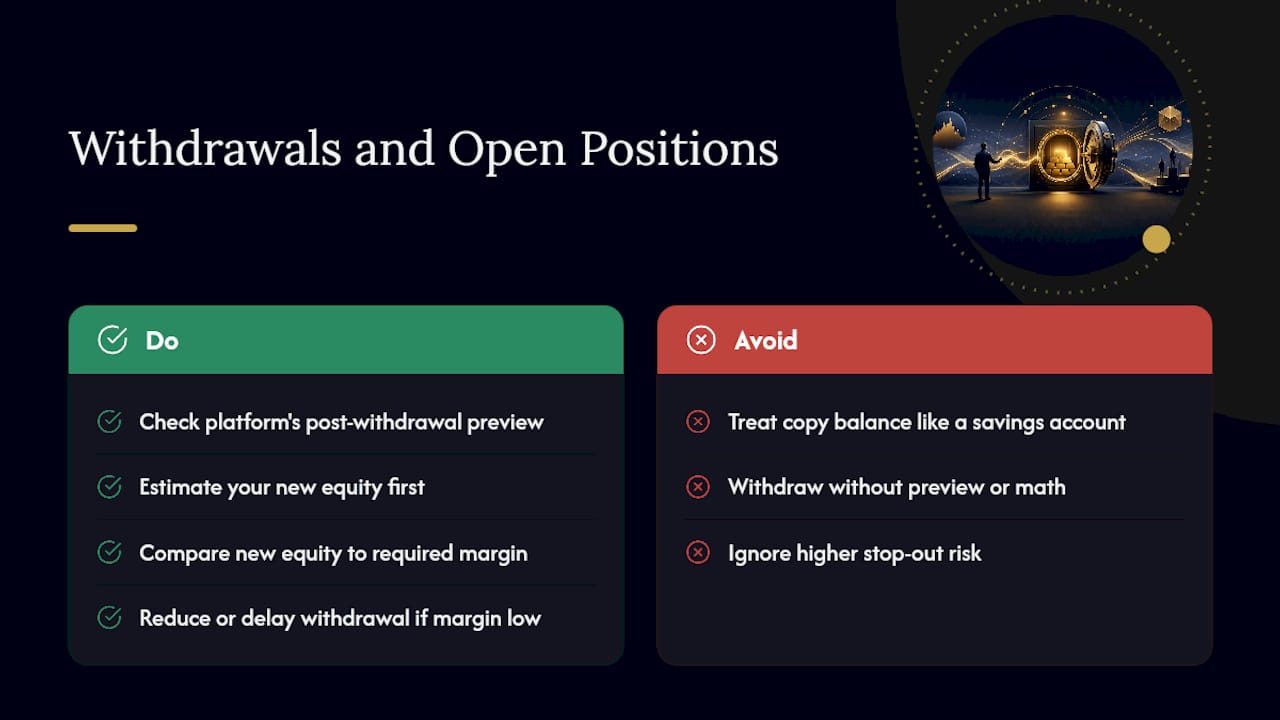
Most platforms resize open positions proportionally to your new equity-to-equity ratio the moment a withdrawal clears. That means your effective leverage shifts, sometimes higher, sometimes lower, depending on how the resize lands. A smaller account balance also means each point of price movement represents a larger percentage swing, which pushes you closer to a stop-out if you haven't left enough free margin. As cTrader's documentation points out, investors often treat copy trading balances like a savings account they can dip into freely, without accounting for how that resizing shifts risk on the trades still running.
Pro Tip: Before confirming any withdrawal with open positions, check whether the platform offers a preview of post-withdrawal free margin. If it doesn't, do the math yourself: estimate your new equity, then compare it against the margin your open positions require. If the number is uncomfortably close to zero, wait or reduce the withdrawal amount.
A withdrawal that looks small on paper can still be the difference between a healthy margin cushion and a forced liquidation on a volatile trading day.
Fixing Common Withdrawal Problems
Most withdrawal issues trace back to one of four predictable causes, and each has a straightforward fix.
If your withdrawal gets rejected for insufficient equity, either reduce the amount you're trying to pull or stop copying entirely and withdraw the full balance instead.
If part of your profit share is frozen, read the pop-up explanation the platform provides rather than assuming it's an error. The freeze usually releases once open positions close or at the next settlement window, a mechanic Bitget documents clearly for its futures copy trading users.
If the transferred amount is lower than expected, check the transaction notes for realized fees, currency conversion charges, or a temporary credit hold.
If you're still confused after checking these, do this:
- Save the transaction ID from your history log.
- Screenshot the withdrawal preview screen and the final transaction entry.
- Contact platform support with both attached, referencing the exact timestamps.
Platforms like cTrader maintain detailed transaction logs specifically so disputes can be resolved with evidence rather than guesswork.
How Sonicaigold Handles Withdrawals
Sonicaigold documents its withdrawal process directly rather than leaving copiers to guess. Requesting a full withdrawal stops the copy relationship and returns your funds to the linked wallet, following the same equity and margin logic covered above.
- Sonicaigold publishes performance reports tied to its XAUUSD strategy, giving copiers a way to verify results independently rather than relying on marketing claims alone.
- The dashboard's transaction history shows realized fees and withdrawal status in one place, so you're not hunting across multiple screens to understand what happened to your balance.
- Setup and minimum deposit details live in a dedicated minimum deposit breakdown, useful before you decide how much to allocate in the first place.
- The withdrawal page walks through where the withdraw action lives inside the dashboard and what to check before confirming.
A Practical Checklist Before You Hit Withdraw
Check your free margin, pending profit share, and minimum allocation before every withdrawal request. Favor smaller, staged withdrawals over one large removal so you can watch how positions react. When in doubt, pause copying first, then withdraw. That sequence costs you nothing and prevents a forced liquidation you didn't see coming.
— Paulo
Managing Withdrawals With a Gold-Focused Copy Strategy
Sonicaigold runs a managed gold copy trading strategy built exclusively around XAUUSD, executed through COPYX and independently verified across 18 consecutive winning months. Unlike copy setups spread across dozens of unrelated instruments, this focus means fewer moving parts to track when you're deciding how a withdrawal will affect your open exposure.

At withdrawal time, the dashboard shows your transaction history, calculates realized fees before you confirm, and walks you through a clear "withdraw" flow rather than burying the details in fine print. If you're already running a copy account and want to see the specific mechanics for a gold-only strategy, the XAUUSD copy trading page covers current allocation minimums and setup steps. New copiers can start with the registration walkthrough to see the full account flow before committing funds.
Where to Verify the Rules for Your Own Platform
Platform documentation is the most reliable place to confirm withdrawal specifics, since rules on minimums, haircuts, and profit-share freezes vary by provider. cTrader's copy trading guide and Legend.trade's documentation both cover proportional resizing and minimum thresholds in detail. For position-sizing math that applies broadly to how withdrawals affect risk, The Final Tape's guide to Monte Carlo position sizing breaks down the underlying logic. Sonicaigold copiers can check strategy-specific rules directly on the withdrawal page before submitting a request.
This article is general information, not a substitute for advice from a qualified financial advisor. Consult a qualified financial professional about your own circumstances before acting on anything here.
Sources
- copy-trading — Legend.trade docs
- Invest in strategies - cTrader Copy
- New Futures Copy Trading - Copiers Guide | Bitget Support Center
- Withdraw Funds from Copy Trading and MAM accounts | B2COPY knowledge base